ESP32 LoPy4
| board ID | radio | deployment |
|---|---|---|
| lopy4 | LoRa BLE Wifi | Strasbourg 30 |
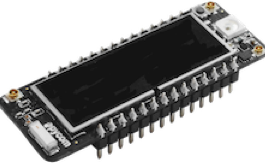
Pycom is an a complete ecosystem for easy IoT development. The IoT-LAB testbed provides access to the Pycom development boards. These boards can be programmed with MicroPython and feature several wireless technologies: WiFi, BLE, SigFox, NB-IoT and LoRa.
Note: it’s not possible yet to use SigFox or NB-IoT because of missing infrastructure and integration within the IoT-LAB testbed.
Datasheet and documentation
You can find a lot of documentation on the Pycom website. IoT-LAB provides two types of boards under same lopy4 board id.
Each Pycom board on Strasbourg site is plugged on the Pycom Expansion Board.
Firmware compilation & flash
The device cannot yet be flashed directly when starting an experiment. You must first start the experiment, then flash the device afterward. The flashing process currently requires a single merged .bin firmware image flashed at address 0x0.
This means you need to merge the different ESP32 binaries into a single binary before using the IoT-LAB flashing command.
esptool provides a merge_bin subcommand for this purpose.
The easiest way to generate the correct command is:
Flash a device once in verbose mode to see the esptool write_flash command used internally.
Adapt this command for merge_bin:
Replace write_flash with merge_bin
Remove the options:
--port, --baud, --before, --after, and -z
Add:
-o <output_merged.bin>
You can then use the generated merged binary with IoT-LAB flashing.
IoT-LAB special configuration
The serial connection baudrate should be configured at 115200 bauds in the firmware.
The UID of the node corresponds to the MAC Address of the Wi-Fi radio chip in station mode.
Troubleshooting
MicroPython based firwmare
Sometimes the REPL doesn’t respond after the experiment startup (e.g. no display of
>>> prompt when sending Enter on the serial port).
In this case, one way to recover the REPL is to perform a power cycle of the
board:
$ iotlab-node --stop
$ iotlab-node --start