MicroPython
boards Pycom
Description
Note: MicroPython on LoPy4 board is not actively supported by IoT-LAB.
MicroPython is an implementation of the Python programming language designed for highly constrained hardware platforms such as microcontrollers.
You can find a lot of documentation on the MicroPython website. The source code of MicroPython is hosted on GitHub.
Basic usage with IoT-LAB
In IoT-LAB, the ESP32 LoPy4 boards can run MicroPython firmware.
Once you run and flash MicroPython firmware, start using MicroPython the Pycom via the remote serial port of the board. The MicroPython REPL can be accessed as usual via the serial redirection mechanism (just press Enter once to get the REPL >>> prompt):
- from the SSH frontend:
<login>@saclay:~$ nc lopy4-<id> 20000 >>> - from your local computer using an SSH tunnel:
$ ssh -L 20000:lopy4-<id>:20000 <login>@strasbourg.iot-lab.infoThen, in another terminal, connect to
localhost:20000withnc:$ nc localhost 2000 >>>
Recommended local usage
Using nc is quite limited though: it’s not easily possible to use the Ctrl+D,
Ctrl+E, etc keyboard shortcuts of the MicroPython REPL because they are first
interpreted by the Linux shell.
That’s why it’s recommended to only interact with the REPL via an SSH tunnel and using local tools instead:
socatto redirect the TCP:20000 port in a TTY like file locallyminiterm.pyfrom the pyserial Python package because it correctly forwards Ctrl+D, Ctrl+E, etc shortcuts to the REPL- the pymakr extension of VSCode
Setup the local REPL redirection
- Open the SSH tunnel:
$ ssh -L 20000:lopy4-<id>:20000 <login>@strasbourg.iot-lab.info
- Start the
socatTCP to file redirection:
$ socat PTY,link=/tmp/ttyS0,echo=0,crnl TCP:localhost:20000
This command redirects the stream from localhost:20000 (which itself is
connected to the serial port via the SSH tunnel) to the local pseudo-terminal
in /tmp/ttyS0.
This way, /tmp/ttyS0 acts a local TTY, exactly like the board was plugged
directly on the computer.
Access the REPL with miniterm
From this point, you can use miniterm.py to connect to the REPL:
miniterm.py /tmp/ttyS0 115200
--- Miniterm on /tmp/ttyS0  115200,8,N,1 ---
--- Quit: Ctrl+] | Menu: Ctrl+T | Help: Ctrl+T followed by Ctrl+H ---

>>>
Use the Ctrl+D to reset the board, Ctrl+E to switch to paste mode.
Access the REPL with pymakr
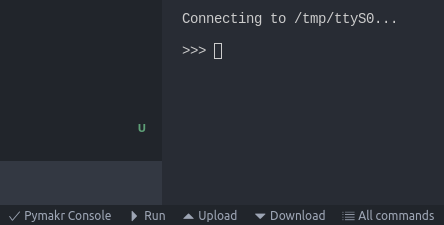
This pycom documentation page explains how to install the pymakr extension of the VSCode editor.
Edit the Pymakr global settings and change/add the address field as follows:
"address": "/tmp/ttyS0"
Then use the control in the bottom menu of VSCode to Run/Upload/Download MicroPython scripts.